Runekeeper: Spell Sigils — one gesture, one move
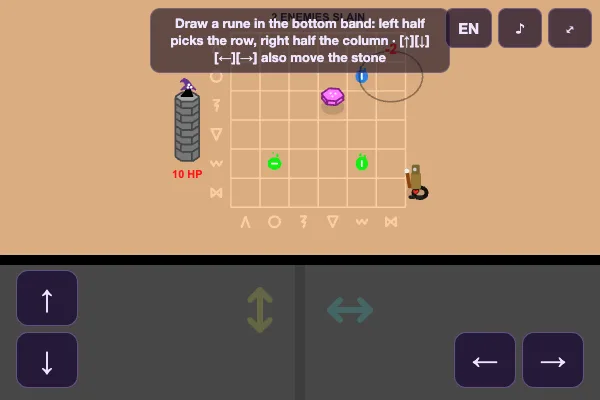
Spell Sigils
No directional buttons. On screen there is a board with a stone runkeeper on it, and a band along the bottom for drawing. You drag a line and that is enough: the gesture becomes the move. Hence the subtitle — Spell Sigils.
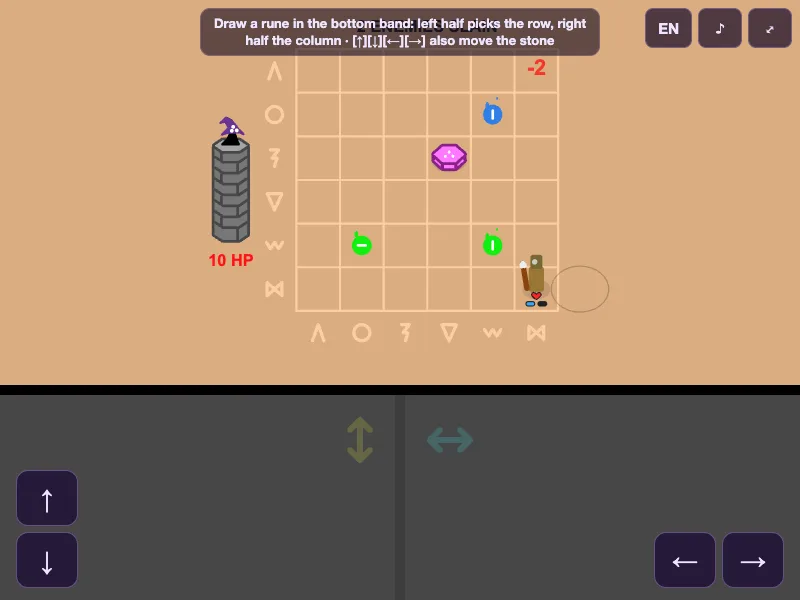
How a rune is read
The bottom band is split in two. The left half picks the row, the right half picks the column. Drag a stroke across and the stone slides to that cell. The keyboard and the on-screen arrows do the same thing, but it is built for the finger: one quick motion and the decision is made.
The engine recognises the shape of the stroke and turns it into a command. You never memorise coordinates — you just draw toward the square you want to step into.
Stone, enemies and spells
Enemies march in from the right, closing on the stone one step each wave. The runkeeper does not strike: it moves and takes a hit only for as long as you let it. The damage comes from the sigils etched on the board — when the stone passes through one, it fires a blast at the enemies around it.
So the game is not "hit the enemy" but "route the stone so a sigil fires". The score up top is the number of enemies slain. Simple and honest: how long you held, how many you dropped.
Finger or arrows
The game grew out of a 13-kilobyte jam and treated touch as the primary input from the start. On a phone it works as intended: you draw straight on the glass. On a desktop the arrow keys and the mouse take over — same gesture, cursor instead. The layout adapts, and the hint band and arrows appear where they are needed.
Who will enjoy it
Anyone tired of button emulators on touch screens. Here the control is the finger motion itself, not a fake gamepad. Short runs, instant start in the browser, no install. Draw a line and play.